
A retailer might have 100 products sitting in its warehouse, but here’s the twist: it doesn’t actually own all of them yet. The supplier still does. The retailer only pays for the goods when they are actually sold or used.
Now think about managing this manually across multiple customers. You’d constantly be asking yourself: How much stock is still lying with each customer? What has already been consumed? What should be billed? And what needs to be taken back?
That’s exactly the kind of situation the SAP SD consignment process is designed to handle. SAP helps track supplier-owned stock that is physically stored at the customer’s location, while clearly separating it from stock that has actually been sold. The tricky part is that not every movement means a sale, so each step in the process matters.
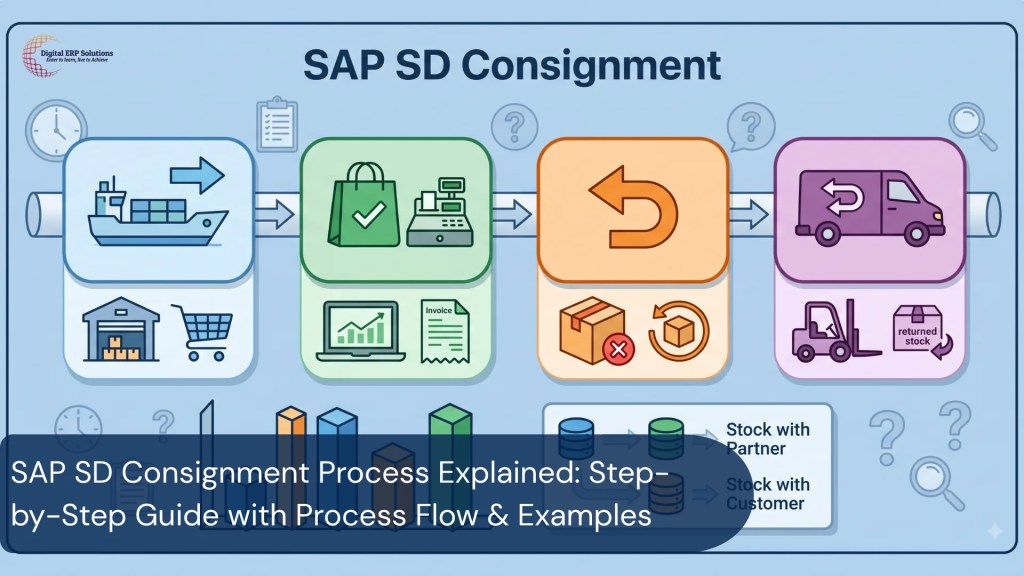
In this blog, we’ll tell you the four key steps, Fill-Up, Issue, Return, and Pickup, and also look at how stock moves through the system, the relevant SAP documents, T-codes, basic configuration, real-life examples, and a few common interview questions.
Quick answer: SAP SD consignment allows a supplier to place stock at a client location yet still own the stock. The buyer pays only when they actually use or sell the goods. SAP does this with four linked processes: Fill-Up, Issue, Return and Pickup, each with its own document type, movement type and billing behavior.
What Is Consignment in Business?
In a consignment setup, a supplier sends goods to a customer, but the ownership stays with the supplier until the customer actually takes the goods out and uses or sells them.
So the customer gets the advantage of having stock available on-site, without paying for everything upfront. The key thing to remember is this:
Physical location and ownership are not the same thing. The goods may sit in the customer’s warehouse, but SAP still treats them as supplier-owned stock, tracked separately as customer consignment stock, and, per SAP’s own documentation, this is managed as special stock, separately for every customer.
Simple Real-World Example of Consignment
A manufacturer sends 100 printers to a dealer. The dealer physically has all 100, but they’re still the manufacturer’s. Later, the dealer sells 25 printers. Those 25 units are issued from customer consignment stock and become relevant for customer billing. The remaining 75 stay in consignment stock at the dealer’s location.
Preparing for an SAP SD Interview?
Why Does SAP SD Have a Special Consignment Process?
At first glance, consignment looks like a normal sales process, but it isn’t. In a normal sale, the customer orders goods, receives them, and gets billed.
In consignment, the supplier first places goods at the customer site. But nothing is “sold” at that point. The actual sale happens only when the customer withdraws goods from consignment stock.
So SAP has to track several things carefully:
- How much stock was sent to the customer
- How much is still unused
- How much has the customer taken
- What was returned
- What was picked back by the supplier
- What quantity is actually billable
Business Benefits of Consignment
This arrangement helps both sides.
- The customer doesn’t need to invest heavily upfront. It is able to use or sell the products first and make the payment after.
- The supplier gains by maintaining the inventory closer to the consumer, making the supply easier and faster.
Expert Insight (Digital ERPS SAP SD Training Team):
The mistake we see most often with new consultants is treating Return and Pickup as interchangeable because both bring stock back. In a live project, mixing them up creates real financial cleanup work. A pickup with no billing history posted as a return can trigger a credit memo against an invoice that was never actually raised.
SAP SD is a functional SAP module, so understanding SAP Functional vs Technical Modules can also help beginners understand where sales and distribution fits within the wider SAP ecosystem.

SAP SD Consignment Process Flow: 4 Key Steps
The SAP SD consignment process is usually explained in four steps:
Consignment Fill-Up → Consignment Issue → Consignment Return → Consignment Pickup
Process | What it does | Billing |
Fill-Up | Sends stock to customer location. | No |
Issue | Customer uses/sells stock | Yes |
Return | Previously issued goods come back. | Credit/adjustment possible |
Pickup | Unused stock is taken back by the supplier. | No |
Overall Process Flow
Supplier Stock
↓
Fill-Up
↓
Customer Consignment Stock
↓
Issue (becomes billable)
↓
Customer ownership + billing
And then:
Unused stock path:
Customer Consignment Stock → Pickup → Supplier Stock
Returned goods path:
Customer → Return → Consignment Stock
A note on document types: In classic SAP SD, you’ll often see document types KB, KE, KR, and KA referenced, along with item categories and movement types. These are widely used in training material and classic customer-consignment configuration, but they are not universal. S/4HANA Cloud and custom implementations frequently use different document types (some teams use CF/CI/CR/CP, for example). The business logic stays the same; the exact configuration depends on your system. If you want to understand SAP SD beyond individual transactions, SAP SD Training Bangalore can help you build practical knowledge of the complete sales and distribution process.

Step 1 – Consignment Fill-Up in SAP SD
What Is Consignment Fill-Up?
Fill-up is the point at which the supplier delivers products to the customer’s location. The products indeed leave the supplier’s stock physically, but ownership is not transferred. At this stage, there is usually no billing, because no sale has happened yet.
Consignment Fill-Up Process Flow
Sales Order → Delivery → Picking → Goods Issue → Customer Consignment Stock
In a typical SAP setup:
- Document type: KB
- Item category: KBN
- Schedule line: E1
- Movement type: 631
- Transaction: VA01
In a classic SAP SD setup, a common configuration uses KB as the sales document type, KBN as the item category, and movement type 631 for the consignment stock transfer. Exact document and schedule-line configuration can vary by system
Example: Sending 100 Units to a Customer
Let’s say a supplier has 1,000 units in stock and sends 100 units to a retailer.
After fill-up:
- Regular/unrestricted stock decreases by 100 units.
- Customer consignment special stock increases by 100 units.
- Total valued plant stock remains unchanged.
- Ownership remains with the supplier.
- No customer billing occurs.
So the goods have only changed location. The ownership is still the same
Step 2 – Consignment Issue in SAP SD
What Is A Consignment Issue?
This is the moment where things actually become “sale-like”. The customer takes goods from consignment stock and uses or sells them. That withdrawal is what triggers billing.
For example, if 100 units are in consignment and the customer uses 20, those 20 are now considered issued.
Consignment Process Flow Issue
Issue Order → Delivery → Goods Issue → Invoice
Typical configuration:
- Document type: KE
- Item type: KEN
- Schedule line: C1
- Movement type: 633
- Transaction: VA01
Example: Customer Uses 20 Units
Opening stock: 100 units on consignment
Post use: 20 issued units
There are 80 pieces remaining on consignment
Those 20 items can now be billed since they are out of consignment stock.
Step 3 – Consignment Return in SAP SD
What Is a Consignment Return?
A return happens when goods that were already issued are sent back. This is not the same as pickup.
Return = already sold/issued goods coming back.
For example, if 20 units were issued and 5 are returned, those 5 are handled through the return process.
When Is a Consignment Return Used?
Returns usually happen when goods are:
- Defective
- Damaged
- Not required
- Returned by end customer
Typical configuration:
- Document type: KR
- Item category: KRN
- Schedule line: D0
- Movement type: 634
Process Flow
Return Order → Returns Delivery → Goods Movement → Credit Memo
SAP supports credit adjustment depending on configuration.
Example: Customer Return 5 Units
After issue: 80 units left
It now returns 5 units 80 +5 = 85 units
If 5 previously issued units are returned, SAP processes them through the consignment return flow. The return reverses the earlier goods issue, and the financial side is handled through the configured credit-memo process. The exact receiving-stock treatment depends on the configured return process.
Step 4 – Consignment Pickup in SAP SD
What Is Consignment Pickup?
Pickup is when the supplier takes back unused stock from the customer. This is very different from return.
- Return = already issued goods.
- Pickup = unused consignment stock.
Consignment Pickup Process Flow
Pickup Order → Returns Delivery → Goods Movement → Supplier Stock
Typical setup:
- Document type: KA
- Item category: KAN
- Schedule line: F1
- Movement type: 632
Per SAP’s Creating a Consignment Pick-Up guide, pickup removes quantity from the customer’s special stock and adds it back to your regular stock, and it is not billing-relevant, since ownership never changed.
Example: Supplier Picks Up 15 Units
If the customer has 85 units in consignment stock
Supplier takes back 15: 85 − 15 = 70 units
Those 15 units go back to supplier stock. No billing happens because ownership never changed.
Expert Insight (Digital ERPS SAP SD Training Team):
Most learners try to debug a consignment issue by starting with billing. That’s backwards. Start with the stock, confirm the customer-specific consignment quantity and the movement type first. If the special stock isn’t correct, no amount of billing troubleshooting will fix the underlying problem.
The best way to understand these scenarios is to work through them in a practical environment. A SAP Real-Time Project can help bridge the gap between learning SAP SD concepts and understanding how they are applied in real business situations.
SAP SD Consignment Stock vs Normal Stock: What’s the Difference?
This is where most confusion happens.
Factor | Normal Sale | Consignment |
Ownership | Customer after sale | Supplier until issue |
Location | Customer | Customer |
Billing | Immediate | Only on issue |
Stock type | Normal stock | Special stock |
Supplier exposure | Ends after sale | Continues until issue |
SAP SD Consignment T-Codes, Document Types & Categories
For a classic SAP SD implementation, the common classic SAP configuration values look like this:
Process | T-Code | Document Type | Item Category | Schedule Line | Movement Type |
Fill-Up | VA01 | KB | KBN | E1 | 631 |
Issue | VA01 | KE | KEN | C1 | 633 |
Return | VA01 | KR | KRN | D0 | 634 |
Pickup | VA01 | KA | KAN | F1 | 632 |
These values are commonly used in SAP SD training and classic customer-consignment configuration. They should not be treated as fixed values for every S/4HANA system. Configuration can be changed based on business requirements and SAP release.
The movement types are useful because they show the actual stock effect:
- 631: Stock moves into customer consignment stock.
- 633: Goods are issued from customer consignment stock.
- 634: Previously issued consignment goods are returned.
- 632: Unused customer consignment stock moves back to supplier stock.
Stock Balance Tracker: How to Self-Check Your Numbers?
Whenever you’re validating a consignment process in SAP SD, in training or on a live project, the fastest final check is a running balance, not the individual transactions in isolation.
Worked example, starting from 1,000 units of supplier stock:
Step | Movement | Customer Consignment Stock | Supplier Stock | Billed Qty |
Start | — | 0 | 1,000 | 0 |
Fill-Up | +300 (631) | 300 | 700 | 0 |
Issue | -80 from consignment | 220 | 700 | 80 |
Pickup | -50 from consignment | 170 | 750 | 80 |
Return | +10 back to consignment | 180 | 750 | 70 (net) |
The check that catches most errors: at any point, Fill-Up total should equal current consignment balance + total issued + total picked up − total returned. If that equation doesn’t balance, something was posted with the wrong movement type, usually a return posted as a pickup, or vice versa. This is the first thing an SAP SD consultant checks before assuming a configuration problem.
SAP SD Consignment Process: Common Real-World Challenges
Here’s something you won’t find in most SAP tutorials: consignment rarely breaks because someone forgot a T-code. It breaks because of timing.
In almost every project we’ve seen, the confusion starts when a customer reports usage late, say, goods were consumed two weeks ago, but the issue only gets posted today. By then, the consignment stock figure in SAP no longer matches what’s physically sitting in the customer’s warehouse. Everyone starts hunting through configuration when the real fix is simpler: get the business process aligned so usage is reported closer to when it actually happens.
The other pattern worth knowing: teams often treat consignment as “set it up once and forget it.” It isn’t. Stock ownership is shifting constantly, and someone needs to reconcile it regularly, not just when billing looks wrong.
Once you’ve seen this play out a few times, you stop treating consignment as a technical config topic and start treating it as a process discipline problem. That shift changes how you troubleshoot everything else in this flow.
Common Issues in the SAP SD Consignment Process
Here are some common problems and what to check first.
Stock Not Visible
Check the customer, material, plant, and whether goods movement was posted correctly.
Billing Not Triggered
Make sure it is actually a consignment issue, not a fill-up or pickup.
Wrong Item Category
Check item category determination and material settings.
Schedule Line Issues
Schedule line controls availability and stock behavior—check configuration.
Stock Mismatch
Always check the full document flow: fill-up, issue, return, pickup.
What Are The Common SAP SD Consignment Interview Questions?
If you’re preparing for an SAP SD interview, don’t just memorise T-codes. Be ready to explain what happens to the stock, who owns it, when billing occurs, and how Fill-Up, Issue, Return, and Pickup are different. For beginners looking to enter the SAP ecosystem, you can also explore Entry-Level SAP Positions to understand the types of opportunities available.
Q: A customer has been billed for 20 units, and the units are returned. Do you use pickup or return?
A: Use consignment return, as the products are already issued and billed. Pickup is intended for unused products remaining in customer consignment stock.
Q: Why does the fill-up not create a typical sales invoice?
- Fill-up only moves stuff that is owned by the supplier to the customer’s consignment stock. At this time, the goods have not been sold, so normal customer billing does not apply.
Q: Why is consignment stock classified as special stock?
A: Consignment stock is managed separately because the material is physically at the customer’s location while ownership remains with the supplier. SAP therefore manages it as customer-specific special stock so the supplier can track the quantity separately from its regular inventory.
Q: What is the difference between movement types 632 and 634?
- 632 is for consignment pickups, where unused items are returned to the source. 634 is for consignment returns. These are products that have previously been issued to the consumer.
SAP SD Consignment Process: Learn It Practically with Digital ERPS in Bangalore
The SAP SD consignment process is actually quite simple once you stop focusing only on T-codes and start thinking about how the stock moves in real life.
The key thing to understand here is not just the transactions, but the flow of ownership and stock at every step. Once that clicks, the whole process becomes much easier to remember and apply. If you’re considering SAP SD as a career path, it is also worth understanding common SAP Module Selection Mistakes before choosing your specialization.
If you are seriously looking for a realistic way to get comfortable with SAP SD, Digital ERPS in Bangalore can help. They focus on practical SAP SD training with real-world project situations and S/4HANA exposure, so it’s simpler to relate what you learn to how it truly functions in companies.
Disclaimer: This article describes SAP SD’s Fill-Up, Issue, Return, Pickup procedure and how it applies to SAP S/4HANA. Document, item, and movement types mentioned here are training/reference values; your real system may differ based on SAP release and implementation. Be sure to check with your SAP functional team before changing settings.
Want to Learn SAP SD Practically?
Related
Discover more from Digital ERP Solutions
Subscribe to get the latest posts sent to your email.


